How to Enable or Disable TUN/TAP in SolusVM 2 Print
- 0
SolusVM 2 allows you to enable or disable TUN/TAP.
1. Log in to your SolusVM 2 Control Panel.
2. Under Projects, click on the project that contains your VPS.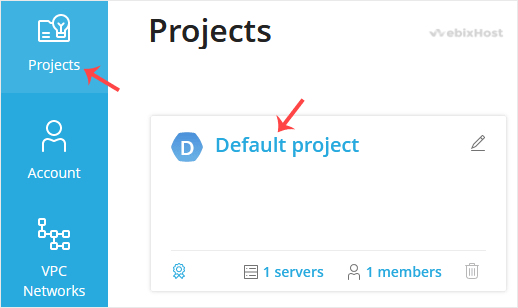
3. Click on the appropriate VPS.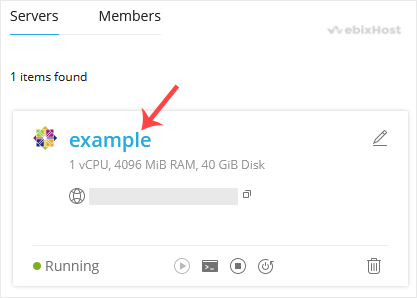
4. Click on the Settings tab.
5. Toggle TUN/TAP to enable it, then click Change to proceed.
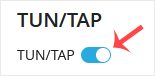
6. After making changes, reboot your VPS.
To disable TUN/TAP, simply toggle it off and restart your VPS.
Now you know how to enable or disable TUN/TAP in SolusVM 2.
Was this answer helpful?
Related Articles
How to Reboot/Restart VPS in SolusVM 2
You can restart VPS via the command line or SolusVM 2.
How to Reboot/Restart a VPS via SolusVM...
How to Forcefully or Gracefully Shut Down the VPS in SolusVM 2
You can shut down the VPS in two ways - forcefully or gracefully in SolusVM 2.
How to...
How to Start/Boot Your VPS in SolusVM 2
If your VPS is down/offline, you can start it using SolusVM 2.1. Log in to your SolusVM 2 Control...
How to Access VPS via VNC in SolusVM 2
You can access your VPS via VNC in an emergency, such as when a firewall blocks your IP, the...
How to Reinstall an OS Using SolusVM 2
You can easily Install/Reinstall the operating system using SolusVM 2. However, note that this...