How to Access VPS via VNC in SolusVM 2 Print
- 0
You can access your VPS via VNC in an emergency, such as when a firewall blocks your IP, the Internet connection on the VPS is not working, and when you cannot access SSH. Also, you can use VNC for OS installation/reinstallation.
1. Log in to your SolusVM 2 Control Panel.
2. Under Projects, click on the project that contains your VPS.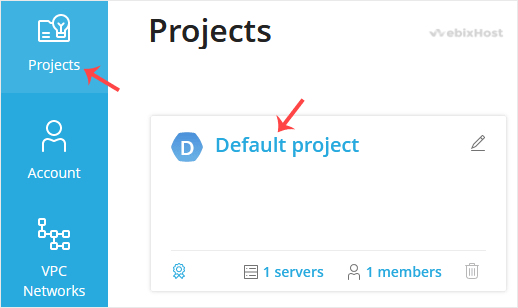
3. Click on the appropriate VPS.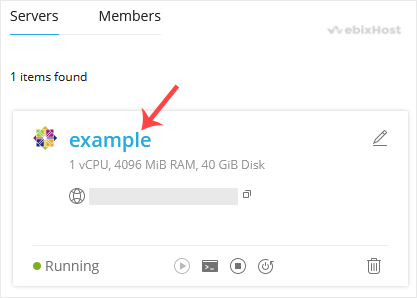
4. Click on the VNC dialog icon.
5. The VNC Area will resemble the following screenshot: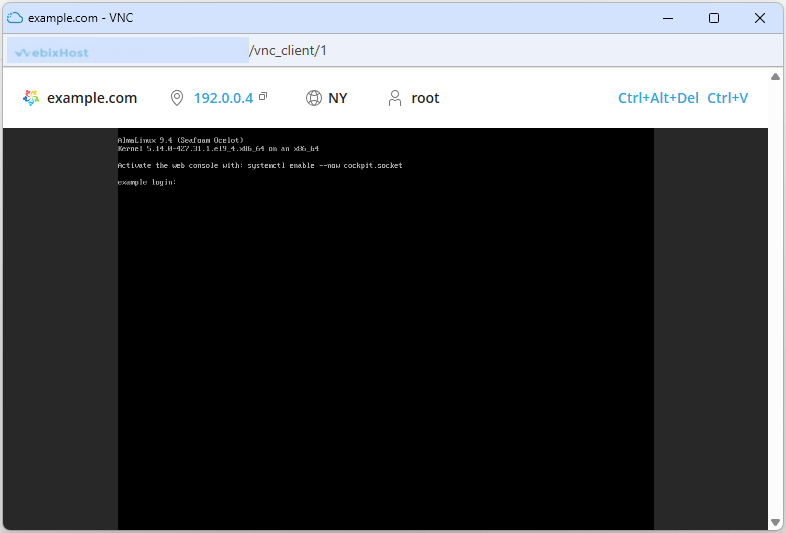
Now you know how to use VNC to access your VPS in SolusVM 2.
Was this answer helpful?
Related Articles
How to Reboot/Restart VPS in SolusVM 2
You can restart VPS via the command line or SolusVM 2.
How to Reboot/Restart a VPS via SolusVM...
How to Forcefully or Gracefully Shut Down the VPS in SolusVM 2
You can shut down the VPS in two ways - forcefully or gracefully in SolusVM 2.
How to...
How to Start/Boot Your VPS in SolusVM 2
If your VPS is down/offline, you can start it using SolusVM 2.1. Log in to your SolusVM 2 Control...
How to Reinstall an OS Using SolusVM 2
You can easily Install/Reinstall the operating system using SolusVM 2. However, note that this...
How to Install an OS from ISO in SolusVM 2
Installing an OS from an ISO image allows customization, such as partition editing and other...