How to Create a Database Username in cPanel Print
- 0
A database username is important for connecting your website or application to the database. You can create a database username by following the steps below.
1. Log in to your cPanel account.
2. In the Databases section, click on Manage My Databases.
3. Under Add New User, in the Username field, enter the new username you want to create.
4. Enter your new password or use a password generator.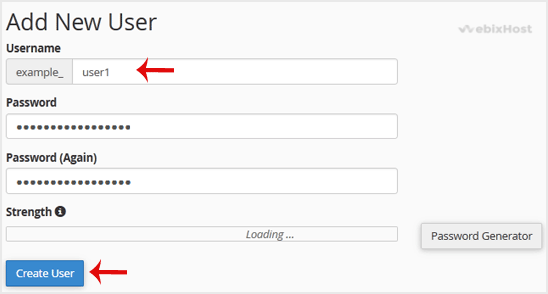
5. Click on Create a User.
Tip: Write down the database username and password on a notepad so you can easily recall them while installing a script manually.
So, by following this tutorial, you have learned how to create a database username in cPanel step by step.
Was this answer helpful?
Related Articles
How to Create a Database in cPanel
Creating a database in cPanel is quick and straightforward. Follow these steps to set up your...
How to Rename a Database in cPanel
Creating a database in cPanel is quick and straightforward. Follow these steps to set up your...
How to Delete a Database in cPanel
You can delete a database in cPanel. Make sure to take a backup before deleting it because once...
How to Add a User to a Database and Grant Privileges
When managing a database in cPanel, it is important to add a user and set the right permissions...
How to Import a Database via phpMyAdmin in cPanel
Importing a database in cPanel using phpMyAdmin is a quick way to restore or migrate your data....